If it worked as you describe, the dragged area should visually disappear from its original location and then reappear in the target area—effectively performing a "cut and paste" operation, where the element lands exactly where it is dropped.
When a selection is dragged, it should disappear from its original position; upon release, it should appear within the boundaries of the rectangle representing it. Clearly, when the waveform is dropped, it does not appear where it is expected to.
The definitive proof that this behavior is incorrect is that it does not function visually—nor in terms of x-coordinates—in the same way as a "cut and paste" operation, even though it should.
When the rectangle (representing the dragged waveform) is released, the waveform is not there. It fails to appear where it is dropped, which is incorrect.
There is no way to justify otherwise; this is an objective fact. My task is to report it.
If you do not consider this a bug, let’s move on to the second report:
When dragging a fade-out to the beginning of a clip—if "snap" is enabled—the grab handle moves outside the clip, where it becomes inaccessible.

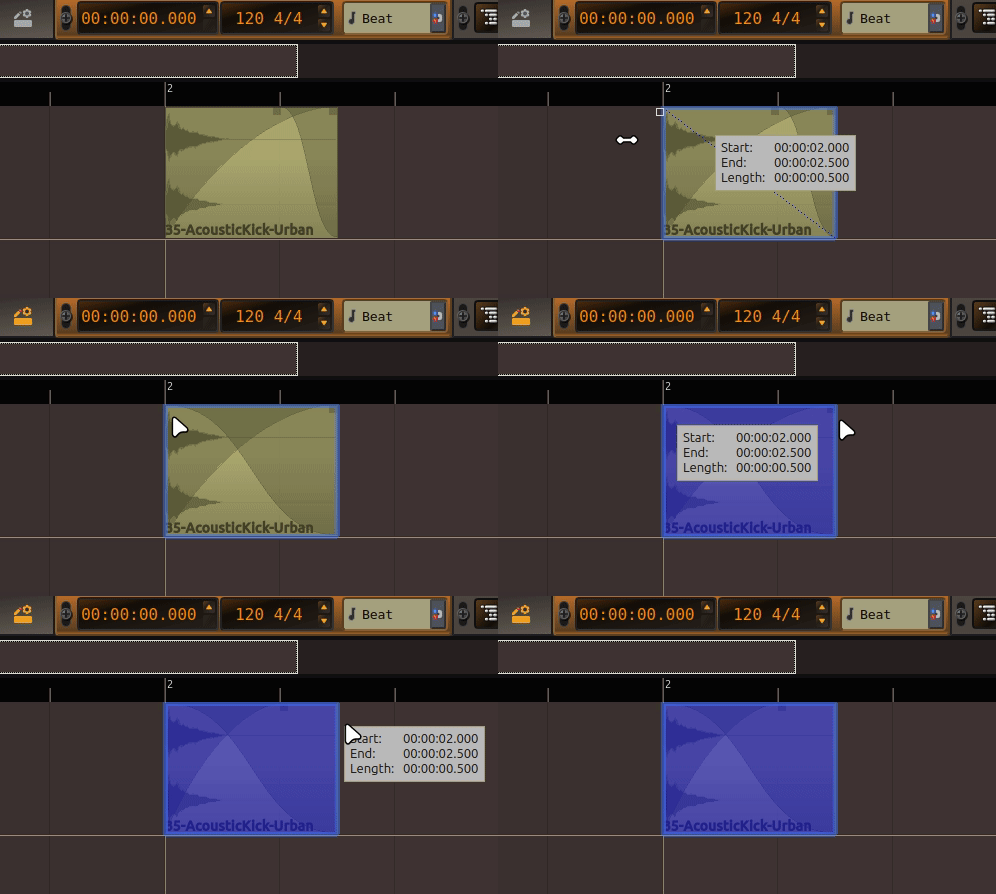
This behavior is confusing and undesirable.
If it worked as you describe, the dragged area should visually disappear from its original location and then reappear in the target area—effectively performing a "cut and paste" operation, where the element lands exactly where it is dropped.
When a selection is dragged, it should disappear from its original position; upon release, it should appear within the boundaries of the rectangle representing it. Clearly, when the waveform is dropped, it does not appear where it is expected to.
The definitive proof that this behavior is incorrect is that it does not function visually—nor in terms of x-coordinates—in the same way as a "cut and paste" operation, even though it should.
When the rectangle (representing the dragged waveform) is released, the waveform is not there. It fails to appear where it is dropped, which is incorrect.
There is no way to justify otherwise; this is an objective fact. My task is to report it.
If you do not consider this a bug, let’s move on to the second report:
When dragging a fade-out to the beginning of a clip—if "snap" is enabled—the grab handle moves outside the clip, where it becomes inaccessible.