
Forums
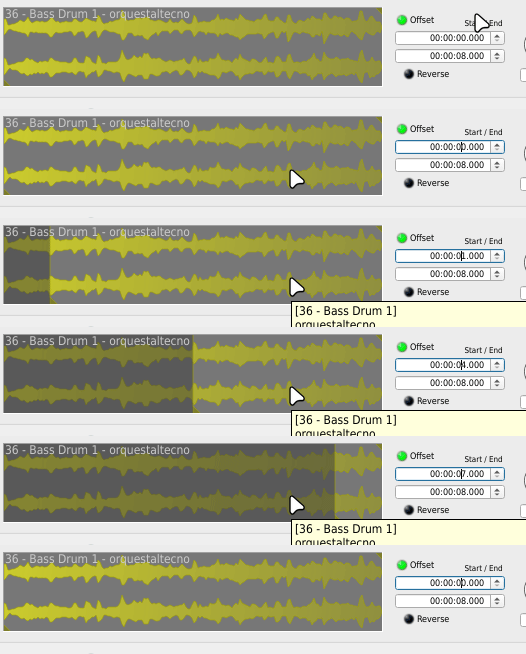
If there were an option to link the start and end points, we could set a duration.
This would allow for easy navigation through samples that contain multiple samples (loops, recording snippets, multi-instrument samples) in the same file.
It would serve a similar function to split-based samplers.
It would also allow for the creation of kits for Drumkv1, where each sample contains different versions of the same instrument (natural snare, electronic, synth, urban, etc.), thus enabling quick customization of a specific kit.
File attachments

re. Link the start and end points...
uh, maybe I'm too old for this... but no,
or else may I ask in all the calm and politeness... what's this all about exactly?
:/
re. Link... what's this all about exactly?
I want to be able to easily switch instrument sounds. Or, to easily extract instrument snippets from loops.
In short, a split functionality.
Since loops can be created at 120 bpm (and if not, forced to this interval using rubberband in Qtractor), and I can create a file containing a different sound (for example, a snare) every 2 seconds (snare 1 from 0 to 2 seconds, snare 2 from 2 to 4 seconds, etc.), if I could link the start and end of the offset, I could navigate and change instruments or loop segments very easily. If I set the offset in seconds and hover the mouse over the seconds field, it advances and retreats in exact second increments.
For example, I set the start to 0 seconds and the end to 2 seconds. If I set the start to 1 second, the end is set to 3 seconds. If I set the end to 4 seconds, the start is set to 2 seconds.
In other words, when linking, changes made to one are reflected in the other, or, put another way, I'm establishing a duration for the offset.
This allows me to precisely extract cuts from a loop, or, as I mentioned, easily create complete, customizable kits. I can quickly switch between different versions (natural, electronic, synth, urban) of the same instrument... which I've previously prepared in a single file. Each file contains several versions of an instrument (kicks.ogg, snares.ogg, claps.ogg...).
It's not the ideal solution, but it's the one I thought might be the simplest to implement.
Ideally, I would include two new options: "Splits" and "Cut Selection."
Splits: setting a number of Splits, and having the spinboxs (start, end) steps adjust to that division.
For example: 8
The steps would be:
0 = (number of frames / 8) x 0
1 = (number of frames / 8) x 1
2 = (number of frames / 8) x 2
...
Cut selection: If I select cut 7, the start and end points are automatically adjusted to cut 7.
Start = (number of frames / 8) x 7
End = (number of frames / 8) x (7+1)
That was the idea; I don't know if it's clearer now... or if it's worth it.
re. Link... what's this all about exactly?
well, it is somewhat clearer now but not really the scope of drumkv1 in any way I'm afraid...
looks like what you really need is an audio editor to court , something that is way out of scope on the simple business mission of drumkv1... I'd say
sorry
Thanks anyway
And thinking about it, you're absolutely right. Drumkv1 should remain clear and simple.
Add new comment